OpenCode
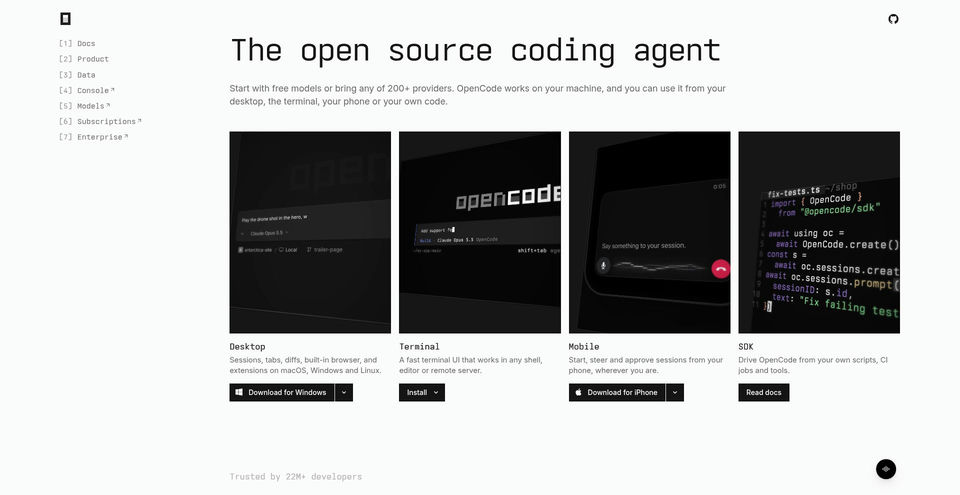
An open-source coding agent for desktop, terminal, mobile, and code-driven workflows.
OpenCode은(는) 무엇인가요?
OpenCode의 주요 기능 및 특징
사용 방법
- 1Install OpenCode Desktop or install the terminal interface using an official method.
- 2Open a project, start a coding session, and choose a free/local model or connect a provider.
- 3Install the mobile app and pair it with the running computer session using the one-time link or QR code.
- 4Use the SDK or APIs to drive sessions from scripts, CI jobs, and tools.
활용 사례 및 아이디어
- Use an AI coding agent from a desktop app, terminal, editor, or remote server
- Steer and approve long-running coding sessions from a phone
- Build automated agent workflows with scripts, CI jobs, and SDK integrations
- Access multiple model providers or local models through one coding agent
제한 사항 및 참고 정보
- OpenCode Mobile is a remote for sessions running on a computer; it does not replace the host computer.
- The iPhone app is distributed as a TestFlight beta.
- Go and Go Plus usage allowances vary by model and usage window; free models remain available when Go limits are reached.
- Console credit purchases incur a listed 4.6% + $0.31 processing fee.
- Provider model usage, pricing, and availability depend on the selected provider or subscription.
OpenCode에 관한 자주 묻는 질문
Yes. The official homepage and docs say OpenCode includes free models that can be used without an account; users can also connect their own providers or local models.
The Go page lists Go at $10/month and Go Plus at $40/month. Both offer curated open-weight models and can be canceled anytime.
Desktop apps are listed for macOS, Windows, and Linux. OpenCode also lists terminal, iPhone TestFlight beta, and Android Google Play apps.
OpenCode Mobile connects to sessions running on your computer. Pair it with the one-time link or QR code generated by `opencode pair --remote`; the link and code expire after five minutes.
No. OpenCode provides free models without an account. Go is an optional subscription for curated models with higher usage allowances.
제품 사양
공식 자료 및 링크
OpenCode의 주요 대안
순위가 확인된 소프트웨어 및 개발 · Coding의 다른 주요 솔루션을 살펴보세요